


Introduction
If you’ve spent any time around cloud teams lately, you’ve probably heard someone mention Bedrock in a meeting and then watched half the room nod along without really knowing what it does. I was in that boat too, until I actually sat down and built something with it.
Here’s the short version: AWS Bedrock is Amazon’s way of letting you use powerful AI models. The kind that power chatbots, summarizers, and image generators without having to train them yourself, host them yourself, or even think too much about the GPUs running underneath. You call an API, you get a response. That’s really the pitch.
What makes it worth paying attention to, especially if you’re already living in the AWS ecosystem, is that it plugs into everything you already use like IAM, VPC, CloudWatch, Lambda, etc.
What Bedrock Actually Gives You
Bedrock gives you three things bundled together:
- Access to foundation models from multiple providers: Anthropic’s Claude models, Amazon’s own Titan models, Meta’s Llama, Mistral, and others. All through one consistent API, so you don’t have to write separate integration code for each one.
- Knowledge Bases, which handle the messy part of connecting a model to your own data (documents, PDFs, product catalogues).
- Guardrails, which let you set boundaries on what the model can and can’t say, useful the moment you’re putting this in front of actual customers instead of just testing it yourself.
None of this requires you to manage a single GPU instance. That’s the serverless part of the pitch, and honestly it’s the part that sold most of the engineers I’ve talked to.
Use Cases
This is usually where people get stuck, not because Bedrock is hard to use, but because “generative AI” is such a broad label that it’s tough to picture where it actually fits into a real product. A few patterns that come up again and again:
- Customer support that doesn’t sound like a customer support bot. Instead of a rigid decision-tree chatbot, you can hook a model up to your knowledge base (product docs, FAQs, policies) and let it answer questions in plain language, grounded in your actual content instead of guessing.
- Document summarisation at scale. Legal teams, ops teams, anyone drowning in PDFs: feed documents in, get a clean summary out. This is one of the lowest-effort, highest-payoff use cases because you don’t even need a Knowledge Base for it. A single API call per document often does the job.
- Internal tooling and automation. Think of a Slack bot that can answer “what’s our current deployment status” by querying internal systems and summarising the result in plain English, or a tool that turns a raw incident log into a readable postmortem draft.
- Search that actually understands what you meant. Traditional keyword search breaks the moment someone phrases a query differently than your database expects. Embedding-based semantic search (which Bedrock supports natively through Titan Embeddings) fixes that. It matches by meaning, not exact words.
- Content generation with a human in the loop. Marketing copy drafts, product descriptions, first-pass code documentation – anywhere a rough draft saves someone real time, even if a person still reviews it before it ships.
The common thread across all of these: Bedrock is rarely the whole solution by itself. It’s the reasoning/generation piece that sits inside a larger workflow you’re already building.
Setup
Enough theory; here’s how to actually get from zero to “I made an API call and got a real response back.”
Step 1: Request model access.
This trips up almost everyone the first time. Even though your AWS account can technically reach Bedrock, you don’t get access to any model until you explicitly request it.
- Open the Bedrock console → Model access (usually in the left sidebar)
- Pick the models you want (Claude and Titan are good starting points)
- Submit the request — for most models, this is instant; a few require a short approval
Step 2: Set up IAM permissions.
Your user or role needs permission to invoke models. A minimal policy looks like this:
{
    "Version": "2012-10-17",
    "Statement": [
    {
        "Effect": "Allow",
        "Action": [
              "bedrock:InvokeModel",
              "bedrock:InvokeModelWithResponseStream"
        ],
        "Resource": "*"
     }
   ]
}
Scope the Resource down to specific model ARNs once you move past experimentation – leaving it wide open is fine for a sandbox, not for anything real.
Step 3: Make your first call.
Using the AWS CLI:
aws bedrock-runtime invoke-model
    --model-id anthropic.claude-3-haiku-20240307-v1:0
    --body '{"anthropic_version":"bedrock-2023-05-31","max_tokens":200,"messages":[{"role":"user","content":"Explain Bedrock in one sentence."}]}'
    --cli-binary-format raw-in-base64-out
    output.json

cat output.json
Or, if you’re more comfortable in Python:
import boto3, json

client = boto3.client("bedrock-runtime", region_name="us-east-1")

response = client.invoke_model(
    modelId="anthropic.claude-3-haiku-20240307-v1:0",
    body=json.dumps({
        "anthropic_version": "bedrock-2023-05-31",
        "max_tokens": 200,
        "messages": [{"role": "user", "content": "Explain Bedrock in one sentence."}]
    })
)

result = json.loads(response["body"].read())
print(result["content"][0]["text"])
If that runs and prints something sensible back, you’re done with the hard part. Everything past this, like Knowledge Bases, Guardrails, Agents, etc., builds on top of this same basic call.
Step 4 (optional but worth doing early): wire up a Knowledge Base.
If your use case involves answering questions from your own documents:
- Drop your source files into an S3 bucket
- In the Bedrock console, create a Knowledge Base pointing at that bucket
- Choose an embedding model (Titan Embeddings is the default, easy choice)
- Bedrock handles the chunking and indexing into a vector store for you (OpenSearch Serverless, by default)
Once that’s set up, your invoke_model calls can be swapped for retrieve_and_generate calls, which pull relevant chunks from your documents before generating the answer.
Why S3 Is the Starting Point for a Knowledge Base
A Knowledge Base isn’t a database you fill in manually; it’s a pipeline that Bedrock builds for you, and S3 is simply where you park the raw material it works from.
Here’s what actually happens under the hood:
- You upload your files to S3 – This bucket is called the data source. Nothing fancy needed here; it’s a regular S3 bucket like any other.
- You point a Knowledge Base at that bucket. In the console, this is a couple of clicks: create Knowledge Base → add data source → select the bucket.
- Bedrock syncs and chunks the content. It reads every file, breaks it into smaller pieces (chunks). For something like a product catalogue, you generally want each chunk to hold one complete product record rather than splitting it awkwardly in half.
- Each chunk gets converted into an embedding. It turns each chunk of text into a vector, a list of numbers that captures its meaning rather than its exact wording.
- Those vectors land in a vector store – OpenSearch Serverless is what Bedrock sets up automatically if you don’t already have one. This is the part that makes semantic search possible: when a user asks a question, their question also gets embedded, and the system finds the chunks whose vectors are closest in meaning, not the ones that just share keywords.
- At query time, the closest chunks get pulled back and handed to the model as context, alongside the user’s question. The model then answers using that retrieved information instead of relying purely on what it was trained on.
A couple of practical things worth knowing before you set this up:
- Sync isn’t automatic by default. If you add or update files in S3, you need to trigger a re-sync of the Knowledge Base.
- File format matters more than people expect. A clean PDF with real text will chunk and embed far better than a scanned image PDF with no text layer.
- One data source can map to multiple Knowledge Bases, and one Knowledge Base can pull from multiple S3 locations.
Architecture Diagram
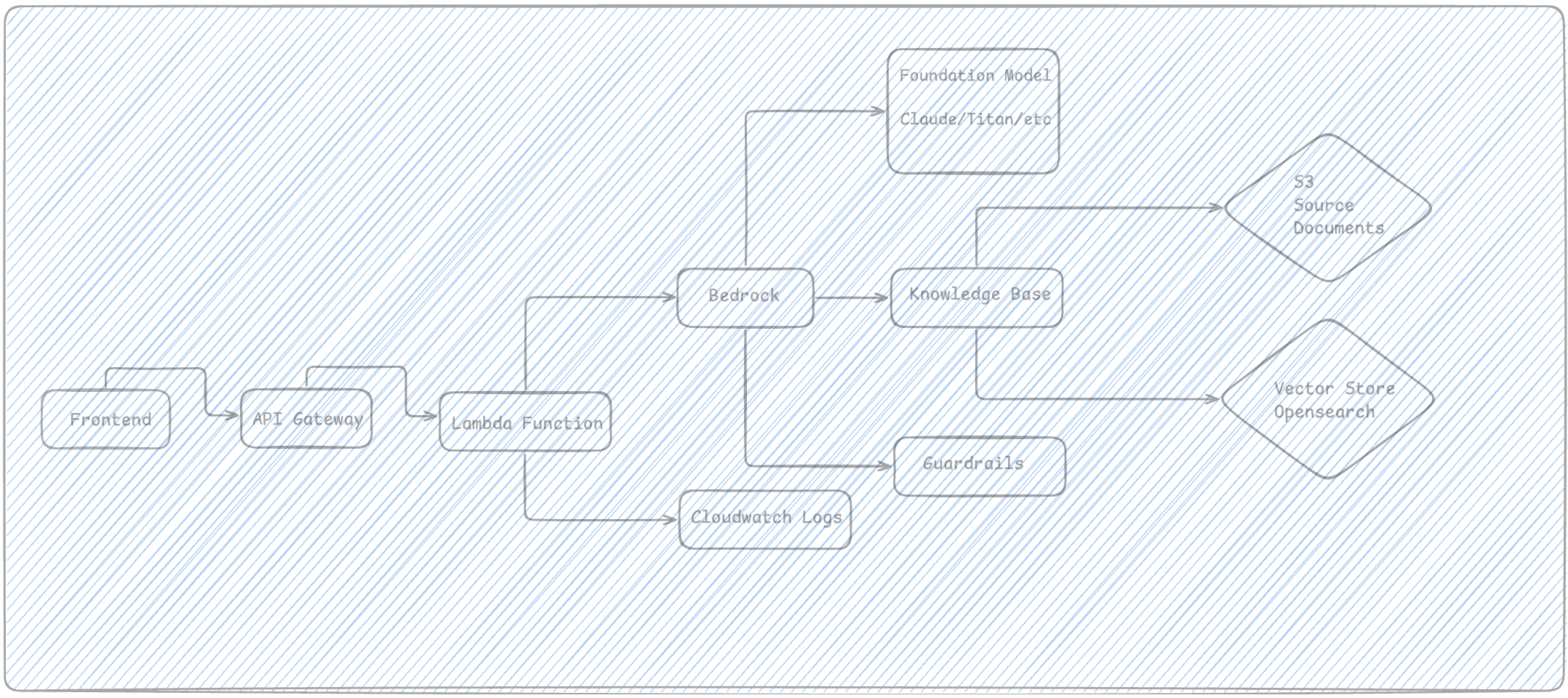
Here’s roughly what a typical setup looks like once you move past a single script and into something resembling a real application:
Things to Watch Out For
A few lessons that aren’t obvious until you hit them:
- Model access requests can lag. Request access to the models you think you’ll need before you’re mid-demo and realise you’re blocked.
- Costs are per-token, not per-call. A single long document summarisation can cost more than a hundred short chatbot replies. Keep an eye on max_tokens and prompt length, especially once you’re not the only one calling the API.
- Not every region has every model. Check model availability per region before you build your architecture around a specific one. Cross-region inference profiles exist now, but it’s still worth confirming upfront.
- Guardrails aren’t a substitute for good prompts. Think of them as the safety net, not the primary control. A well-written system prompt does more work than people expect.
Conclusion
Bedrock isn’t magic, and it’s not trying to be. It’s a fairly practical piece of infrastructure that removes the most annoying parts of working with large language models: hosting, scaling, and juggling five different vendor APIs. Once you’ve made that first successful call, the rest is mostly about deciding what you actually want to build on top of it.