


How do you redirect thousands of customer subdomains in AWS?
Without creating an ALB rule for every customer?
A few weeks ago I got handed something that sounded like a non-issue. Redirect a subdomain to a path. One line in the ticket, basically. I assumed I’d knock it out before lunch, and instead spent most of the day rethinking how the whole thing should be built. That gap between “sounds trivial” and “actually trivial” is usually where the interesting stuff lives.
The Setup
Say you’re running a SaaS and every customer gets their own subdomain, which is a pretty common pattern at this point:
acme.myapp.com
globex.myapp.com
initech.myapp.com
There’s no separate app behind each of those though. One codebase, and every customer just sits under a path:
myapp.com/acme
myapp.com/globex
myapp.com/initech
So when someone hits acme.myapp.com, you want them landing on myapp.com/acme instead. That’s the whole ask, and it reads like a DNS problem at first glance. I definitely treated it like one for the first ten minutes, before realizing DNS can’t actually finish the job on its own.
Why this is two problems, not one
There are two separate things that need to happen here, and I hadn’t split them apart mentally until I sat with it a bit.
First, acme.myapp.com has to resolve to something — that part’s just DNS doing what DNS does.
Second, something has to actually tell the browser to go somewhere else, which means firing back a redirect response:
301 Redirect
Location: https://myapp.com/acme
DNS has no concept of a redirect. It maps a name to an address and stops there. So you need a component sitting between the request coming in and the response going out — something that reads the hostname, figures out which customer that maps to, and sends the right redirect. Building that piece well is where most of the actual decisions live.
The load balancer rule approach, and where it starts cracking
Since I already had an ALB in front of things, the first instinct was obvious: just add a rule.
IF Host = acme.myapp.com
THEN redirect to myapp.com/acme
One for Globex. One for Initech. Repeat.
And to be fair, if you’ve got ten customers, this is genuinely fine. I wouldn’t tell anyone to overengineer that. Ship the rules, go home.
But I kept picturing what this looks like once you’re not at ten customers anymore, you’re at a thousand. At that point you’ve got a rule sitting in your infra config for every single signup, and that’s not really scaling with your business so much as it’s accumulating alongside it.
AWS caps you at 100 rules per Application Load Balancer by default, and yeah, you can file for a quota increase, but that just pushes the wall a bit further out rather than removing it. Eventually you’re splitting traffic across multiple ALBs purely to keep routing hostnames, which is a weird thing to be doing just to redirect people to a path.
There’s a second problem too, and honestly it bugged me more than the quota thing. Right now a new customer signing up is probably just an insert into a table somewhere. One row. But if you’re managing redirects through the load balancer, a signup suddenly means creating a rule, configuring the hostname, wiring up the destination, and deploying that change. A business event — somebody clicking “sign up” — now triggers an infrastructure deployment.
The question I should’ve been asking from the start
At some point, probably while staring at the fifteenth rule I was about to copy-paste, it hit me that I was solving the wrong problem. I kept asking “what rule do I write for this customer.” The better question is “given any hostname at all, how do I figure out where it should go.”
That second framing isn’t a rules problem anymore — it’s a lookup.
Subdomain → Customer → DestinationOnce I saw it that way, the whole rule-per-customer idea stopped making sense. You don’t need a rule for every customer. You need one piece of logic that handles every customer you currently have, plus whoever signs up next week that you’ve never heard of.
What that actually looks like in practice
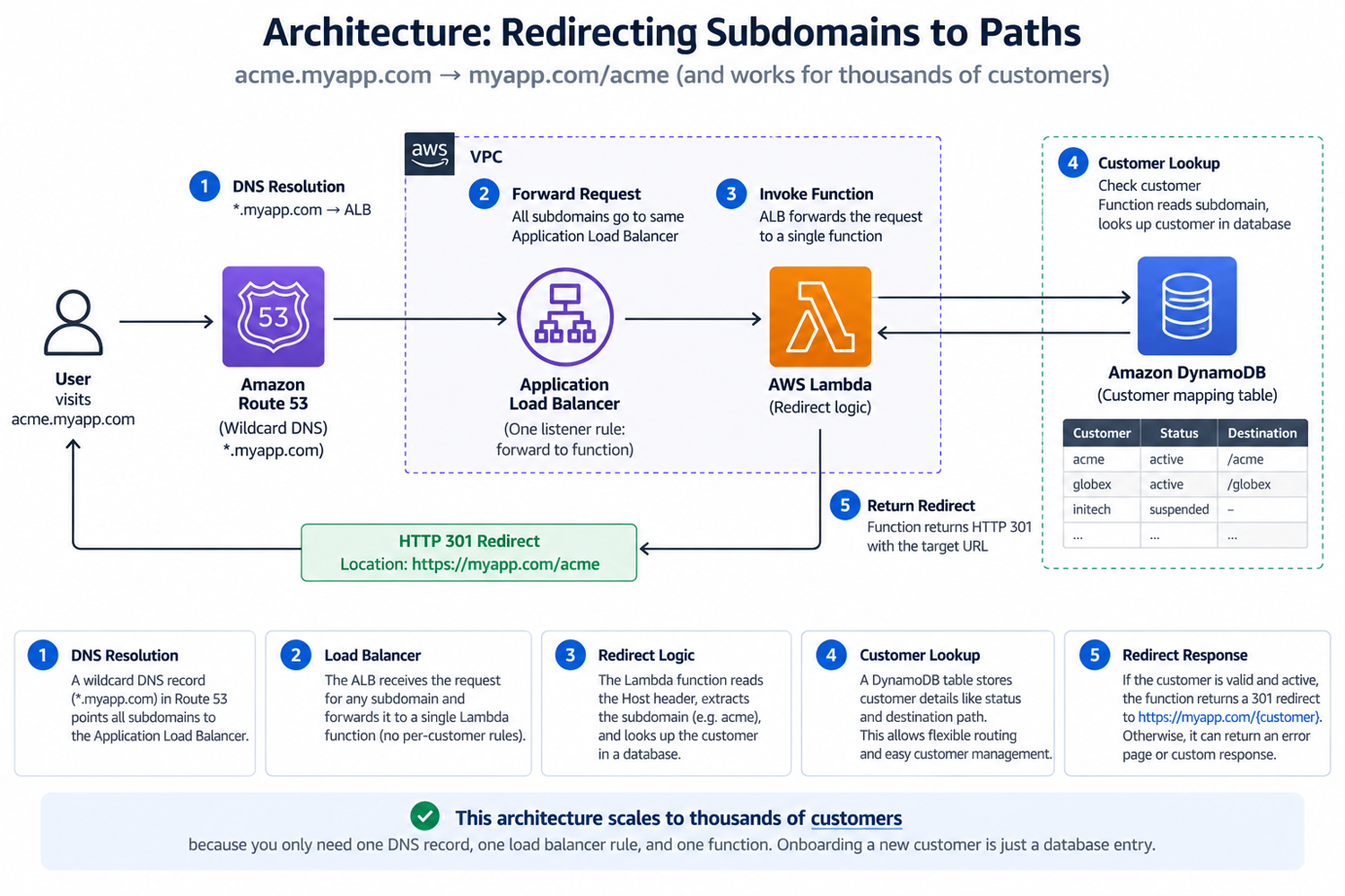
Redirecting Subdomains to Paths Architecture
                acme.myapp.com
                       │
                       ▼
               *.myapp.com
               Wildcard DNS
                       │
                       ▼
                Load Balancer
                       │
                Forward request
                       │
                       ▼
                   Function
                       │
                Read Host header
                       │
                Extract "acme"
                       │
                 Lookup customer
                       │
                       ▼
              301 → myapp.com/acme
The wildcard DNS record is doing most of the work here. Instead of a new DNS entry per signup, one entry covers everyone:
*.myapp.com → your load balancerAcme, Globex, and a customer who hasn’t even signed the contract yet all hit the same infrastructure, and nobody has to touch DNS again after this point. The load balancer’s role shrinks down to just forwarding — it doesn’t need to know anything about Acme specifically, which is honestly how it should be.
The actual thinking happens inside the function:
Host: acme.myapp.com
      ↓
   "acme"
      ↓
Lookup customer
      ↓
Return destination
Customer 3,000 signs up, and nothing in your infrastructure moves. You add a row to a table somewhere and you’re done for the day.
The lookup table is quietly doing the heavy lifting
You could write the function so it just chops the hostname and constructs a path directly:
acme.myapp.com → acme → myapp.com/acmeI’d steer away from that pretty hard, actually. There are too many situations it doesn’t handle. What happens when someone hits random.myapp.com and there’s no customer by that name? What if a customer got suspended an hour ago? What if their redirect target isn’t a plain path anymore because their setup changed?
A small lookup table takes care of all of it without the function needing to hardcode anything:
| Customer | Status | Destination |
|---|---|---|
| acme | active | /acme |
| globex | active | /globex |
| initech | suspended | — |
The function just checks the data and does whatever it says. No special cases living in the code itself.
Don’t skip the security part — open redirects are an easy mistake here
If you build the redirect target straight out of whatever’s in the incoming request, you’ve basically built an open redirect vulnerability and handed it over gift-wrapped. Someone could exploit that to bounce your users off your trusted domain toward something like:
https://malicious-site.comThe fix isn’t exciting, but it matters: validate the hostname, confirm the customer is real, and only ever redirect to destinations your system actually controls. Don’t take the Host header at face value, ever, no matter how convenient it’d be.
None of this is free, to be clear
Putting a function in the middle of this request path isn’t a strictly-better move. It has costs.
Latency
There’s added latency, since the request now has to pass through the function before anything comes back. Usually small, but a cold start or a slow database round-trip can make it noticeable.
Database dependency
There’s also a database dependency baked in now. If the function’s querying on every request, your redirects are only as reliable as that database’s uptime. Caching helps, obviously, but then you’re trading some of that reliability for a delay in how fast changes actually take effect.
Wildcard SSL certificates
And wildcard SSL certificates trip people up more than anything else on this list. A cert for *.myapp.com covers acme.myapp.com fine, but it does nothing for acme.dev.myapp.com.
If your environments stack subdomains like that, you need to plan the certificate strategy ahead of time — this is not something you want to discover while debugging a production TLS error at 11pm.
So which one do you actually go with?
Small customer base, not expecting explosive growth? Just use ALB rules. There’s no shame in simple, and it’s genuinely easier to operate and reason about at that scale.
Expecting real growth into the hundreds or thousands? Don’t build something where every signup means an infrastructure change. Wildcard DNS, one function, a lookup table — that’s the direction.
The function itself isn’t really the interesting part of any of this, if I’m honest. The actual point is that infrastructure and customer data are two different things, and the moment they get tangled together you’ve built yourself a scaling problem without meaning to.
Your infrastructure should mostly sit still. Your data is the thing that’s supposed to move.
Wrapping up
This was never really about redirects.
It’s about catching the moment your infrastructure starts growing at the same rate as your business — a rule per customer, a config entry per customer, a resource per customer.
That pattern is worth stopping and looking at whenever it shows up, because it usually means something that should be a row in a table has ended up as a piece of infrastructure instead.
Sometimes the rule-based approach really is the right call, to be clear. You don’t need a database, a function, and a caching layer bolted on just because it sounds more impressive in a blog post.